
Certificates
An identity of its own for every device, compatible with your PKI
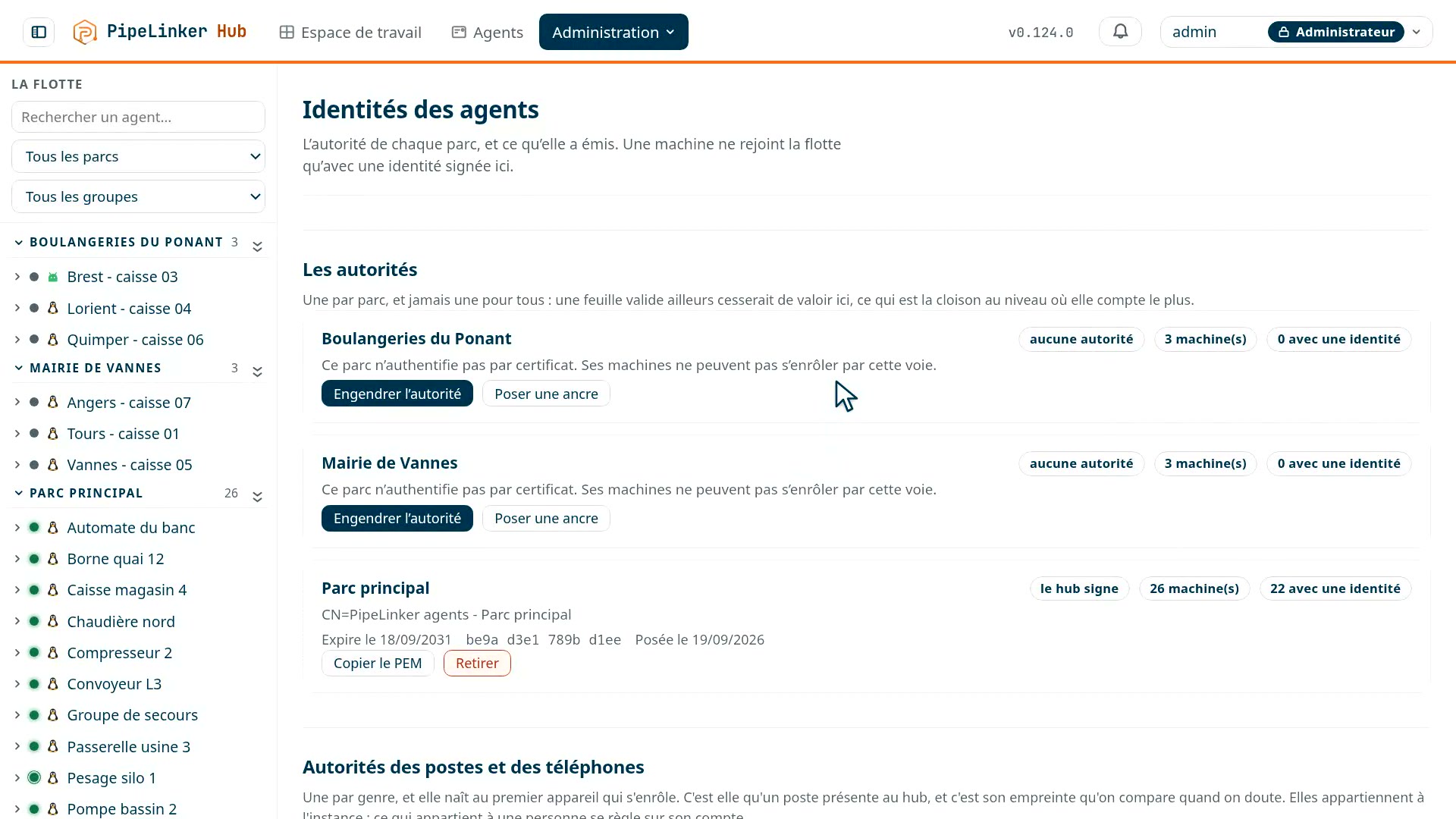
The hub recognises the agents allowed to join your fleet by a cryptographic identity. Every machine authenticates with a certificate whose private key never leaves the device. What that certificate rests on, however, is a choice: an anchor pinned per fleet, with no common root, which makes verification fail from one fleet to the next; or the trust chain your organisation already runs.
 Prise 9
What this gives you, plainly
Only the devices you have recognised establish a relationship with the hub, and your organisation keeps the choice of the trust model that suits its constraints. An identity stolen on one machine is worth nothing on another, nor in another fleet.
What an agent's identity is
An agent does not authenticate with a token dropped in a configuration file, but with a client certificate, presented in the TLS handshake. Its private key is generated on the machine and never leaves it: it is neither transmitted, nor backed up, nor copyable.
What remains is what that certificate rests on. Two models, chosen fleet by fleet, and the choice does not change the price of your licence.
Two models, not two suppliers
The difference between them is not who signs, but the shape of the trust. One pins an anchor per fleet and knows no common root; the other is a classic PKI, with its chain going up to your root.
The first segments better, the second integrates better. That is the whole trade-off, and it is made fleet by fleet.
In both cases the authority is yours. The hub runs on your machines: the one it generates is born on your premises and does not leave them, the one you entrust to it was already yours. We hold no authority, we sign none, and there is nowhere a root that would let us into a fleet.
An anchor pinned per fleet
This is the default mode, and it is not a PKI in the usual sense: there is no common root. Each fleet carries its own self-signed authority, which the hub pins; there is nothing above them to link them together.
It is the absence of a common root that segments
The hub does not trust "an authority": it trusts this anchor, for that fleet, and it knows which one signed the certificate it is shown. An identity valid in one fleet does not verify in another - the validation fails, there is nothing left to filter afterwards.
The authority also carries a name constraint: it can only sign under its own subtree, which the verification library enforces before any application check. And it cannot generate a subordinate authority: what it signs is a leaf, and nothing else.
Moving a machine from one fleet to another therefore reissues its identity. That is the intended consequence, not a side effect: its old identity would mean nothing anywhere else.
Nothing to do: it creates itself
You do not ask for it and you do not install it. The hub generates it along with the fleet, and signs identities as machines enrol and renew.
The hub writes the name, it does not read it
A signing request is written by whoever presents it. Letting them choose their own name would amount to letting them choose their identity, and that is the classic flaw of internal PKIs - silent, because all the rest of the request is perfectly valid.
Only two things are kept from the request: the public key, and the proof that the requester holds the matching private key. Everything else is written by the hub.
No revocation list, and that is deliberate
A leaf lives ninety days. A certificate you failed to revoke expires by itself before the discussion about revoking it is over. There is no long tail of machines nobody updates: the fleet is maintained along with its hub.
A trust chain, if you already have one
This is the classic model. If your organisation already runs a certificate authority, the hub hooks into it rather than creating one more: you give it your authority's public certificate, fleet by fleet. That is all.
It holds the anchor, it does not hold the key
The hub keeps that certificate as a trust anchor: what it verifies an agent's certificate against. The signing key is never handed to it, so it issues no identity for that fleet - your PKI delivers your machines' certificates, following your own procedures.
Changing a fleet's anchor is the heaviest operation in this setup: it reissues all its identities. So the hub keeps when it was set and by whom.
A template says how to read your names
Your PKI issues machine123.corp.example.com, not the form the hub writes for
its own leaves. So you give it a template, {agent}.corp.example.com, where
{agent} marks where the identifier sits.
A template, not a regular expression. A regular expression would give more power than needed to a field an administrator fills in, and "more power than needed" on a trust decision is precisely how one ends up writing a pattern that accepts everything.
It is anchored at both ends: {agent}.corp.example.com cannot be satisfied by
attacker.corp.example.com.elsewhere.net. And an empty identifier, or one that
spills onto one more label, is not an identifier - without that check, two machines would
end up under the same name.
A queue for what knocks at the door
A machine the hub does not know yet, but whose certificate is valid, enters a waiting queue if the fleet accepts it. It still reaches nothing; the operator sees it arrive, and attaches or rejects it.
Without that, an enterprise PKI would have no way in: its certificates are valid and name nothing the hub knows.
Tell us what equipment, behind which networks. We show you the console on it.
Fleet by fleet, not all at once
The model is chosen for each fleet separately. One fleet can live on its pinned anchor while another is hooked to your chain. That is what makes it possible to introduce certificate authentication gradually, on a pilot fleet first, instead of switching a whole estate one morning.
What each mode makes you carry
With the pinned anchor, the signing key lives in the hub, and it stays online by necessity: an identity is signed at enrolment and at every renewal, with nobody in front of the screen. Putting it under glass would require a ceremony every sixty days and per machine.
This is not a weakness of the setup, it is its shape: the client certificate protects against a secret stolen in the field, not against a compromised hub. Whoever holds your hub already holds your sessions; that they could also issue an identity does not change their position much.
With your chain, the hub holds no key and therefore cannot issue anything. That is what you gain.
What you lose is the segmentation by the anchor. Your root is common to what it signs: a leaf issued for one fleet stays cryptographically valid under that root, and it is then the template and the hub's application check that hold it back - no longer the failure of verification itself.
If you run several strictly partitioned fleets, this is worth weighing. For a single fleet, the question does not arise.
Where the private key lives, device by device
"Never leaves the device" is verified differently depending on the device, and it is better said than guessed. On each one, the key is generated locally, the hub only receives the public half, and the best shelter the machine offers is taken first, the next one only if it is missing - and the screen says which one took the key.
| Device | Where the key is | Failing that |
|---|---|---|
| PipeLinker Desktop, Windows | In the TPM, through the system's key store: the key never exists as bytes, not even for the program that uses it. | The software key store, non-exportable, encrypted for the account; then a file sealed by DPAPI, readable by that account on that machine and by nobody else. |
| PipeLinker Desktop, Linux | In the TPM (/dev/tpmrm0): the chip returns the key wrapped by its own seed, loadable there and nowhere else. Copying the file gives nothing. |
A file readable by that account alone. |
| PipeLinker Mobile, Android | In the Android Keystore, hardware-backed when the device has it, and tied to unlocking: the key signs nothing while the phone is locked. | - |
| Linux and Windows agent | A file next to the certificate, created with restricted permissions from the moment it is written - not set afterwards -, readable by the agent's account alone. | - |
| Android agent | In the Android Keystore, hardware-backed when the device has it: the agent can sign with it, it cannot read it. | - |
In every case, a backup restored elsewhere, a cloned disk or a replaced device carry no identity: it is a new enrolment, from the console, and the old certificate is revoked in one gesture.
Not to be confused: the hub's own certificate
Everything above concerns the identity of the agents. The certificate the hub presents to a browser is another matter, and a simple one: the hub reads two files in a folder, and what puts them there is none of its business - certbot, acme.sh, an enterprise PKI, or a certificate placed by hand.
A proxy that terminates TLS erases the client certificate
This is the main thing to know before placing the hub in an existing infrastructure. A client certificate only exists in the TLS handshake: a reverse proxy that terminates it removes it, and no agent connects any more.
The console's name, for its part, goes behind a proxy like any other site. It is the name the agents reach that must arrive at the hub without being terminated on the way.
The price does not depend on this choice
Internal or enterprise, this is an architecture decision, not a commercial option. The licence counts neither authorities nor certificates: it only knows the size of what you run - your machines, your accounts, your fleets. Partitioning properly must never carry a price. The pricing, and what a fleet is
Page last updated on 22 September 2026. Technical page, maintained by the PipeLinker team at LOOTUS SECURITY, publisher of the product. The date comes from the repository, not from a hand edit.