
Containers
Manage Docker and Podman remotely, with no inbound port and no SSH
PipeLinker manages the Docker and Podman containers of a machine from the PipeLinker Hub console, with no inbound port and no SSH, under five separate rights: Compose stacks, containers, images, volumes and networks, a recorded terminal inside the container, its live logs, its charts and its thresholds. Every action goes into the security log.
How an action travels. The operator asks for a named action - restart, pull, open a terminal - in the hub console, which checks their right and writes it to the log before sending it. The agent, which called the hub outbound, builds the call itself and passes it to the Docker or Podman engine through the socket its configuration names. Nothing the hub sends reaches the engine as a command line.
What the Containers tab shows
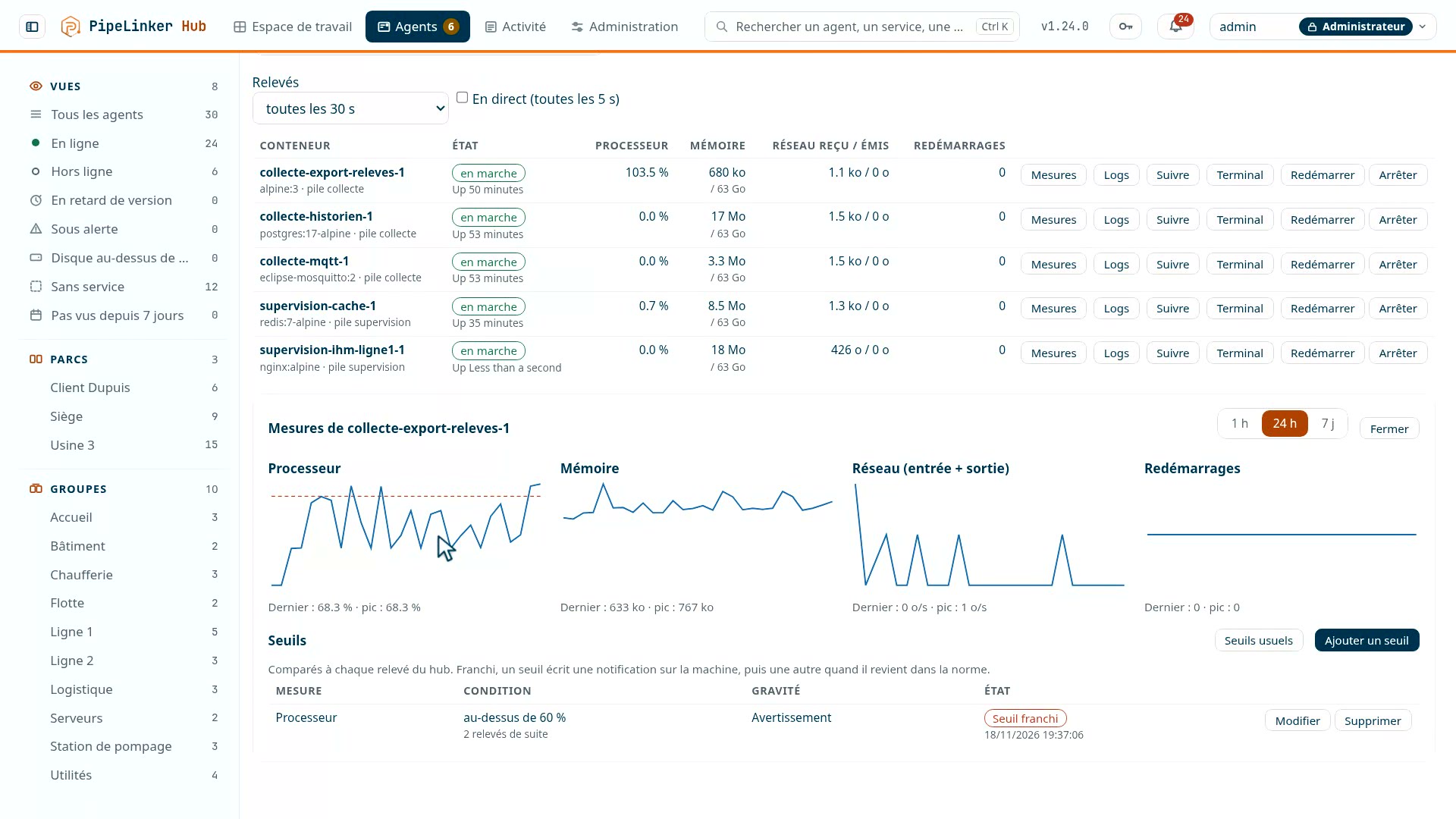
On the page of a machine whose agent reaches a Docker or Podman engine, a Containers tab gathers what runs and what makes it run:
- Compose stacks, one folder per stack under a root the machine allows (
/var/lib/docker/composeby default, set per machine); - containers, with an instant reading: CPU, memory, network, restarts and health;
- images, with their size and the ones no longer used;
- volumes, with their size and the orphaned ones;
- networks, with their subnets and the containers attached to them.
Start, stop, restart, pull, recreate
A container starts, stops and restarts from its row. So does a stack, which can also pull its images and then recreate itself - the everyday update of a Compose service. Every action is confirmed on screen, written to the security log before it leaves, then completed with the machine's answer: an action that fails stays readable, with its reason.
The Compose client follows the engine: Docker's with Docker, Podman's with Podman. There is nothing to align from one machine to the next.
Edit a stack without writing blind
A stack's Compose file and its .env are edited in the console. They are
checked by compose config before being written: a syntax error
or a missing variable is refused before it reaches the machine. The previous version is
kept on the machine, next to the stack. Creating a stack works the same way.
A deleted stack is stopped first, then its folder is moved to the root's bin. Its volumes stay: stopping a stack never removes its volumes, and the data they hold does not leave with it. A root the machine does not allow, or a link pointing out of it, is refused by the agent.
A terminal inside the container, its logs live
"Terminal", on a running container, opens a terminal inside it: its
bash if it has one, its sh otherwise. The agent chooses what runs,
and nothing from the console reaches the container's command line. It is a session like any
other: recorded according to the machine's policy, observable live, cut outside the allowed
time windows, and its exit code is kept. A terminal closed from the console leaves nothing
running in the container.
Logs can be read two ways: the last 200 lines, and up to 2,000, with standard output and errors told apart; or "Follow", which replays the last lines then everything the container writes, errors in red. Following logs is not recorded by the hub: the engine already keeps those lines.
Samples, charts, thresholds and notifications
Sampling follows the machine's monitoring. A "Monitored" machine has
its containers sampled at its level's cadence (Baseline 300 s, Standard 60 s, Reinforced
and Sensitive 30 s), or at a cadence of its own, from 30 seconds to one hour, set by an
account that holds watch.manage. An up-to-date agent sends its measurements
itself. The hub keeps raw samples for 8 days, then an hourly aggregate for 90 days, both
adjustable. A machine that is not monitored is not sampled.
"Measures" charts a container's CPU, memory, network throughput and restarts over one hour, one day or seven days, with the threshold drawn across. A container is followed by its name: recreated by Compose, its chart carries on.
Thresholds are rules of active monitoring, on the Monitoring page: sustained CPU, memory, restart loop, unhealthy, container stopped, unusual network and disk throughput, unexpected exit, out of memory. An override can target a single container of a machine. The alert names the machine and the container, goes out when the threshold is crossed and again when it clears, reaches the "Security" role and the webhooks, and stays in the alert history. The "Live" box rereads the list every 5 seconds while it is on screen, without keeping anything.
 Prise 29
Tell us how many machines and containers. We will show you the tab on a demonstration fleet.
Five separate rights
Reading a container's state, reading its logs, restarting it, opening a shell inside it and rewriting its stack do not call for the same trust. Each has its own right, granted by role, fleet and machine like everything else in the hub.
| Right | What it allows | Built-in roles that hold it |
|---|---|---|
docker.read | see the state, the charts and the thresholds | the three reading roles |
docker.logs | read the logs and follow them live | operations, delegated administration |
docker.control | start, stop, restart, pull, recreate | operations, delegated administration |
docker.exec | open a terminal inside a container | operations, integration, delegated administration |
docker.stacks | write stacks and read their .env | delegated administration only |
The right to the machine's terminal opens no container, and the right to a container's terminal opens no shell on the machine. Every setting and every refusal goes into the security log.
Remote, with no inbound port and no SSH
The agent on the machine calls the hub outbound and keeps the channel open: nothing listens on the machine, and nobody needs an SSH account there to manage its containers. The agent reaches the engine through the socket its configuration names, and builds every call itself from an action the hub names: nothing the hub sends goes to the engine as a path, a request body or a command line. It is the same route as PipeLinker's other kinds of access, described on the remote access page.
The feature can be switched off per machine, group, fleet or instance from the console. It can also be switched off on the machine itself, when installing the agent or in its configuration, and the console then cannot switch it back on.
What it does, what it does not do
| What it does | What it does not do | |
|---|---|---|
| Getting started | opens on a machine whose agent configuration names a Docker or Podman socket | does not open while that configuration names no socket, whatever the console says |
| Agent | works with an up-to-date agent that declares the container engine and the container terminal | asks nothing of an older agent: the hub says so, rather than opening the machine's shell instead |
| Stacks | checks the Compose file and the .env before writing them, keeps the previous version | does not remove the volumes of a deleted stack: they stay on the machine |
| Terminal and logs | records the terminal according to the machine's policy and cuts it outside the allowed hours | does not record log following, which the engine already keeps |
| Sampling | charts over 7 days, raw samples kept 8 days then 90 days hourly, active monitoring rules and alerts | samples nothing on a machine that is not monitored |
| Privileges | goes through the engine's socket, without SSH or an inbound port | does not reduce what the socket grants: with Docker, socket access is root on the machine |
What to know before you switch it on
Access to the Docker socket is equivalent to root. To reach Docker, or a Podman started by root, the agent's account must belong to the group that owns the socket, and that group is root on the machine. Rootless Podman only grants the powers of its own account: it is the choice to make when the machine allows it. The five rights say who may ask the hub for what; they change nothing in what the agent can do on the machine.
Nothing is open by default. With no socket named in the agent's configuration, the feature stays closed on the machine, and sampling stays off as long as the machine is not monitored. You also need an up-to-date agent: an older agent does not offer the tab, and the hub never asks it for a container terminal.
Questions we are asked
Can we manage a site's containers without opening SSH?
Yes. The agent calls the hub outbound and reaches the engine through its socket: stacks, containers, logs and the terminal go through the console, with no SSH account on the machine and no inbound port. Every action is written to the security log.
Does the agent need root rights?
With Docker, or a Podman started by root, its account must be able to talk to the socket, which is root on the machine. With rootless Podman, it only has the powers of its own account. Either way, the feature can be switched off on the machine, with no way back from the console.
What happens to a stack we delete?
It is stopped, then its folder is moved to the bin of the stacks' root. Its volumes are not removed: the data stays on the machine, and deleting it is your decision.
Page last updated on 19 November 2026. Technical page, maintained by the PipeLinker team at LOOTUS SECURITY, publisher of the product. The date comes from the repository, not from a hand edit.